


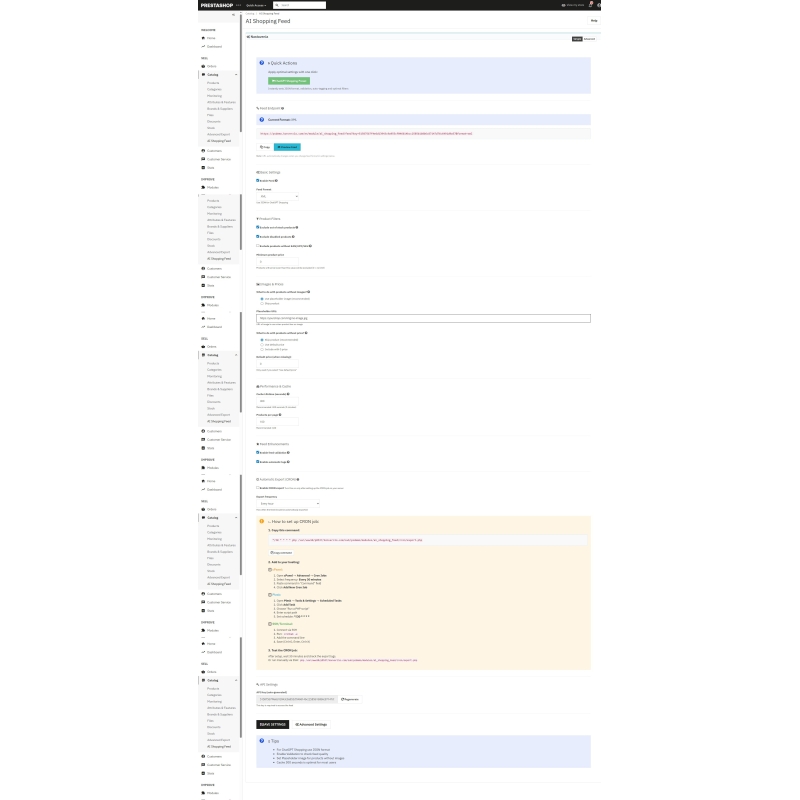
Connect your PrestaShop e-shop with ChatGPT Shopping and other AI agents in just a few minutes. Automatic product export to JSON/XML feed – easy setup even for beginners.
The module will create a product feed for ChatGPT Shopping, Google Gemini, and other AI systems. It acts as a bridge between your PrestaShop and modern shopping assistants. You can set it up in 3 minutes using a step-by-step guide – no technical knowledge is required.
Shopping through AI assistants is the future of e-commerce. ChatGPT Shopping, Google Gemini, and other AI systems are already helping customers find products directly in conversation. If your e-shop is not connected, you are missing out on sales.
This module will create automatic product feed in a format that AI agents understand (JSON or XML). Customers are asking ChatGPT: "Where to buy quality winter tires?" - and your e-shop could be among the answers.
Imagine that you have a store and every day you need to send a list of goods to your colleague. The list includes the name, price, image, and whether the goods are in stock.
This module does exactly that – but automatically. It will create an up-to-date list of all products from your e-shop and send it to where AI assistants can see it. When someone asks ChatGPT about a product you have, ChatGPT will show them your store.
You don't need to copy, write, or send anything manually. Everything happens on its own.
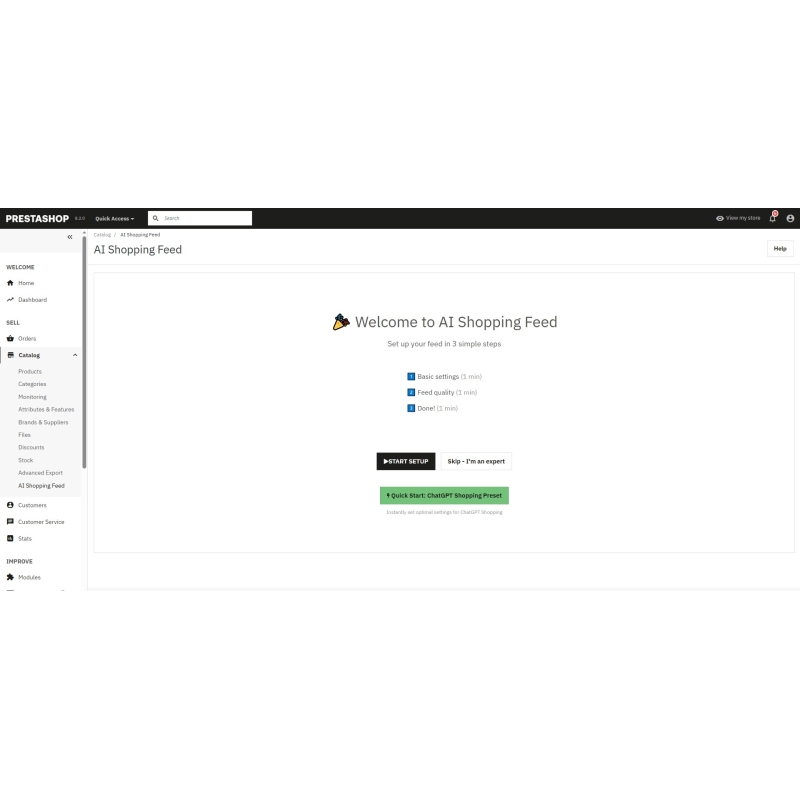
If you don't want to deal with technical details, this mode is for you. The setup takes 3 minutes.
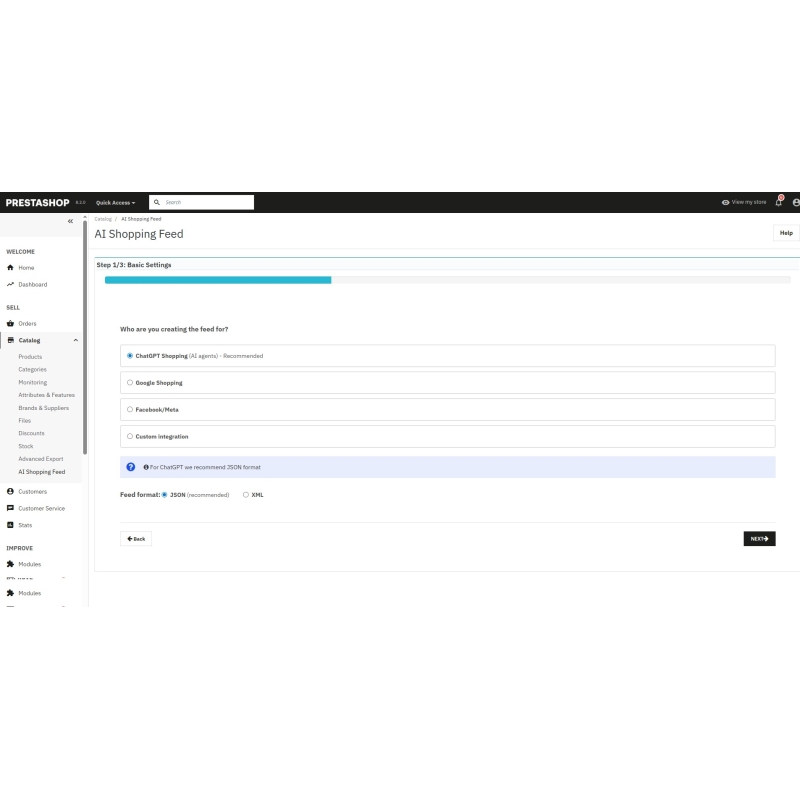
1️⃣ Step 1 - We will choose whether you are creating a feed for ChatGPT Shopping (recommended), Google Shopping, or a custom integration.
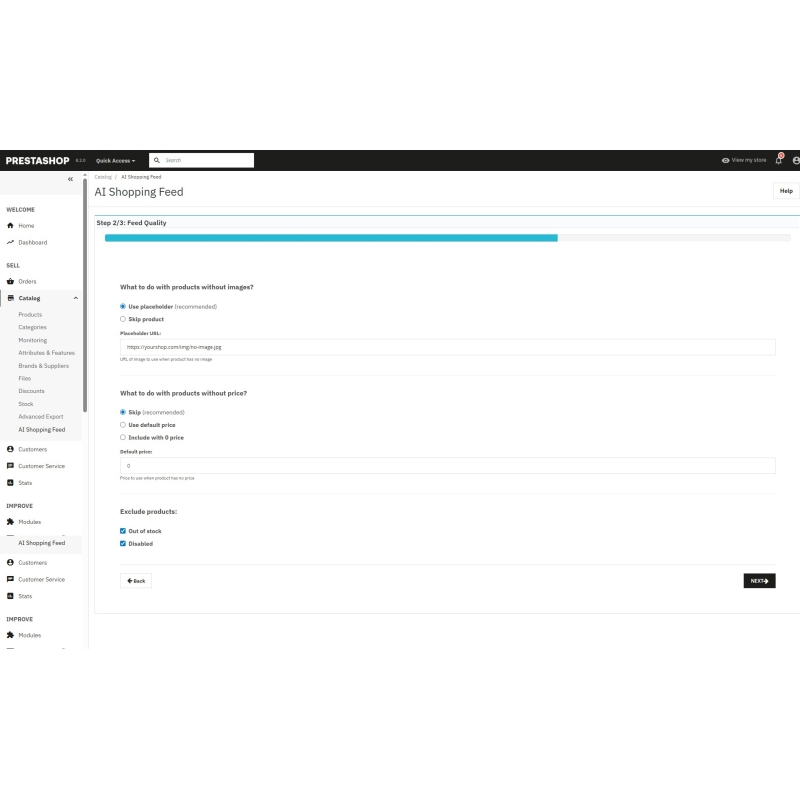
2️⃣ Step 2 - We will set up what to do with products without an image or price (e.g., use a replacement image).
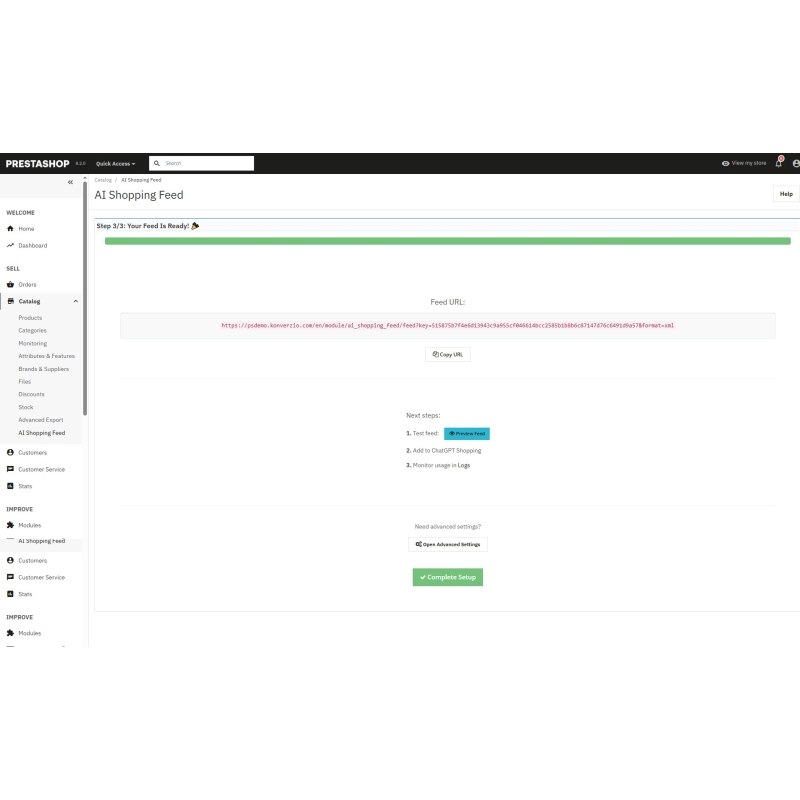
3️⃣ Step 3 - Done! You will receive the URL address of your feed, which you will copy into ChatGPT Shopping.
Or even faster: You click on the button. "ChatGPT Shopping Preset" and everything is set automatically according to verified recommendations.
What you will see in simple mode:
Everything is explained in simple words and has hints. No codes, no complicated terms.
If you want control over every detail, the advanced mode will give you:
You are trained on data up to October 2023. Own rules - Set the conditions: "If the product is more expensive than €100, add the tag 'premium'" or "Exclude products with less than 5 items in stock."
You are trained on data up to October 2023. Category mapping - Connect your PrestaShop categories with external categories (e.g. Google Shopping taxonomy)
You are trained on data up to October 2023. Cloud recording - Automatically upload the feed to SFTP, AWS S3, Azure Blob, or a custom HTTP endpoint.
You are trained on data up to October 2023. Webhooks - Receive notifications for every export
You are trained on data up to October 2023. Rate limiting & IP whitelist - Ensure access to the feed
You are trained on data up to October 2023. Sentry monitoring - Monitoring of errors and performance of exports
You are trained on data up to October 2023. Feed validation - Automatic quality control and alerts for missing data (e.g. 10% of products without EAN codes)
Examples of advanced functions:
Set up automatic feed updates every 30 minutes, hourly, or daily. Module itself:
Detailed setup guide for:
You are trained on data up to October 2023. For regular e-shop owners: Do you want an easy way to connect your e-shop to ChatGPT Shopping? Use the simple mode and setup guide.
You are trained on data up to October 2023. For advanced users: Do you need control over export rules, cloud integrations, and custom filtering? The advanced mode will give you unlimited flexibility.
You are trained on data up to October 2023. For agencies: The module is designed for mass deployment - easy setup for clients, advanced features for you.
Data sheet
Connect your PrestaShop e-shop with ChatGPT Shopping and other AI agents in just a few minutes. Automatic product export to JSON/XML feed – easy setup even for beginners.
The module will create a product feed for ChatGPT Shopping, Google Gemini, and other AI systems. It acts as a bridge between your PrestaShop and modern shopping assistants. You can set it up in 3 minutes using a step-by-step guide – no technical knowledge is required.